

Automated web accessibility testing that sets the standard
From scanning thousands of pages to fixing the last error. AI-driven tests, powerful crawling, multi-engine scanning, unlimited on-demand testing, and a complete analysis and remediation workflow in one place.
Scanning
Accessibility Cloud combines multiple scanning engines, unlimited on-demand capacity, and advanced crawling to test your entire site, including pages behind logins, user flows, and content across multiple domains. Configure what gets scanned, set your compliance targets, and let the platform handle the rest.
Multiple accessibility defect scanning engines
Not all scanning engines catch the same issues. Accessibility Cloud lets you test with multiple engines, including ACAI, our AI-powered engine, axe-core, and QualWeb. You can test your site with the same engine your country’s monitoring agency uses, so you can make meaningful comparisons and ensure nothing slips through.
Availability

User flow testing
Static page scans only tell half the story. Many accessibility issues surface only after user interactions, such as opening menus, filling out forms, selecting filters, or completing a checkout.
Accessibility Cloud can mimic real user interactions to uncover defects hidden behind membership flows, search, payments, shopping carts, booking systems, contact forms, and more. Visit your site, record your user flows, and let Accessibility Cloud test what other tools can’t.
Availability
Availability as add-on

Unlimited on-demand accessibility defect scanning
Scan your entire site whenever you want, with no limits, on all plans. Accessibility Cloud’s hyper-scalable infrastructure means you’re never waiting or rationing scans.
Expected scanning speeds:
- 5,000 to 10,000 pages per hour for sites hosted in Scandinavia
- 3,000 to 5,000 pages per hour for sites hosted elsewhere in Europe
- 2,000 to 3,000 pages per hour for sites hosted anywhere else in the world
- 10,000 to 100,000 pages per hour with an Accessibility Cloud on-prem scanner
Scanning performance depends on how fast Accessibility Cloud can communicate with your web server. Public scanners are primarily located in Scandinavia, with new scanners deployed to additional geographies as needed.
Availability

Scan pages and documents behind logins
Test pages and documents that require authentication. Accessibility Cloud supports re-authentication features and advanced scan parameters so you can reach the content your users actually interact with, not just your public-facing pages:
Login credentials, HTTP headers, and JSON payloads for authentication.
Availability
EnterpriseAuthentication systems can be bypassed by creating a user flow for the login page.
Availability
EnterpriseAvailability as add-on
Standard Monitoring Agency Infrastructure AuditorAuthentication tokens can be spoofed to bypass authentication systems
- Cookies
- HTTP headers
- Local storage
- Session storage
Availability
All editions, all plansWhitelisting of IP addresses or user agents of scanners.
Availability
All editions, all plans

Built to scale with your organization
Add as many websites, subdomains, viewports, and partial scans as you need. Accessibility Cloud doesn’t force everything into a single domain. Whether you manage one site or hundreds across different regions and configurations, the platform adapts to how you work, not the other way around.
Availability

Powerful scanning options
Fine-tune what gets scanned by including or excluding languages, specific content, pages, URLs, and CSS selectors across your sites. Configure the scanner’s behaviour, accept cookie banners, dismiss overlays, and interact with pages before testing commences.
Availability

Multiple compliance targets
Set one or more compliance targets for each site, for both automatic and manual tests. Choose the conformance level (AA or AAA) and optionally include accessibility errors that go beyond strict violations. Supported standards include:
- WCAG 2.1
- WCAG 2.2
- EAA
- EN 301 549
- BITV
- RGAA
- Section 508
- ADA
- See all supported compliance targets
Availability

Run your first scan today
Test your site with multiple engines, unlimited capacity, and full control over what gets scanned. No integration required.
Results and views
Every scan produces structured, actionable results, not just a list of errors. Four distinct views let your team approach results from different angles depending on whether you are fixing individual pages, tackling widespread patterns, reviewing improvement opportunities, or confirming potential errors flagged by AI.
Every scan produces four distinct views, each designed for a different stage of your remediation workflow:

See how your results are organised
Scan your site and explore page-by-page analysis, error type views, improvements, and potential errors in one place.
Filters and sorting
A scan of a large site can return thousands of results. Accessibility Cloud gives you the tools to cut through the volume: filter by content type or team role, deduplicate identical errors, group reoccurring patterns, and prioritise by user impact so your team always works on what matters most.
Availability

Content filters
Focus on what matters most. Filter by pages with errors, pages with critical errors, pages with recently discovered errors, pages with AAA conformance level errors, pages with WCAG 2.2 errors, or pages with dismissed errors.
Role filters
Not every error is every team member’s responsibility. Filter results by the role best suited to fix the problem: Developer, UI Designer, UX Designer, Editor, or Manager. Each person sees what is relevant to them and knows where to start.
Find, sort, and prioritise at scale
When a scan returns thousands of results, raw lists are not enough. Accessibility Cloud groups reoccurring errors so you see one entry instead of hundreds, deduplicates identical errors found across multiple pages, and ranks everything by user impact so you fix what matters first.
Search across all results, switch between list views, and in error type analysis, group error types by violated success criteria for a compliance-oriented overview. Compare errors from two different scan dates to track your progress over time.
Availability

Thousands of results, zero guesswork
Let Accessibility Cloud prioritise, deduplicate, and organise your scan results so you can focus on fixes, not spreadsheets.
Error breakdown
Every error includes a description of the problem, the user impact it causes, which WCAG violations it triggers, the CSS selector of the affected element, and a code excerpt showing the exact markup. You also see which roles can help with remediation, the test rule that flagged the error, and a list of every other page on your site where the same error occurs.
Each error also includes guidance on how to fix the problem, how to test that the fix works, and good and bad code examples.
Availability

Visual highlighting
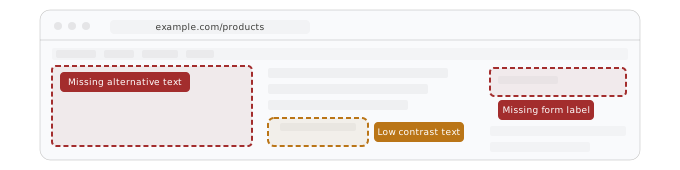
Errors are highlighted directly on top of your live site, so you can see exactly what users experience without switching between tabs or reading through code.
Availability
ACAI-powered solution suggestions
Two levels of fix guidance are available. ACAI analyses the specific element with the error and generates a tailored solution suggestion. You can add your own context and direction to refine the suggestion further. For broader guidance, scan engine-generated suggestions provide generic remediation steps.
Availability

Annotations
Add notes, details, guidance, and screenshots to any error. Everything stays attached to the error record, so your team always has full context when they pick up remediation work.
Availability

Every error, fully explained
From code excerpts to AI-powered fix suggestions, every error comes with what your team needs to resolve it.
See it with your own site’s data.
Share errors where your team already works
Send individual errors directly to the tools your team uses every day. Copy to clipboard, share via email, or share to Azure DevOps, GitHub, Jira, Trello, GitLab, Asana, Monday.com, ClickUp, Zapier, Make, and others.
No switching between platforms. No copy-pasting error details into tickets. One click from error to task.
Export your data
Export your full error dataset to Excel for reporting, compliance documentation, or offline analysis. Chart contents can also be exported to Excel separately.
Availability

Ready to make your digital experience accessible to everyone?
Take the first step toward a more accessible digital presence. With AI-powered scanning across web, documents, and mobile apps, human-led auditing, guided remediation tailored to your tech stack, and a global network of accessibility experts, Accessibility Cloud gives you everything you need in one platform.
Get a demo
Get a trial
Want to join the community?
Find us on Discord